Stelian Firez

Stelian Firez

I design usable interfaces that are aesthetically pleasing.

Always available for a chat on twitter or email.
European Union
  • 29 Dec 2013

    Mac apps I’ve used most in 2013

    Mailplane

    Mailplane

    Probably by now a lot of people know what Mailplane is. So, as you can imagine, I use it to manage my four Gmail accounts. It has the features of a desktop app combined with the power of the Google machine.

    YoruFukurou

    YoruFukurou

    Still my favourite Twitter client. I cannot find anything better in the market. But with its moderate stagnation and my ever-growing “following” number, YoruFukurou might not be as appealing as it once was. So the thought of building my on Twitter client is back.

    1Password

    1Password

    It’s difficult to give it a better description than I have last year. Maybe this video of David Teare at Çingleton will shed some more light on the company(AgileBits) that makes 1Password. Also, have a look at the App Store “Best of 2013”.
    Continue reading…

  • 28 Dec 2013

    I’ve only read two books this year

    And I’m not saying this with any arrogance that these two books would suffice for a whole year. Quite the opposite: I admit, shamefully, that I read so little. The only small defence I can present is that my Instapaper’s full and my podcast subscription list has doubled in 2013.

    So here are the two books:

    • Unlabel: Selling You Without Selling Out by Marc Ecko
    • Remote: Office Not Required by Jason Fried and David Heinemeier Hansson

    I enjoyed both of them and I hope next year to read two books a month.

  • 27 Oct 2013

    How to remove the Safari cookies at login

    This script has been tested only in Mavericks. If you have applications that start at login and use the ‘cookied’ process, you might experience some unexpected behavior from those apps.

    Let me exemplify: I have Mailplane enabled to open at startup and I use Gmail’s 2-step verification. If the ‘cookied’ process is stopped while Mailplane is running, the latter will not be able to access the cookies, so Google will send me an SMS with the code to authorize the computer – pretty unpleasant to have it every day.

    Clearly, this situation can be avoided by just starting Mailplane after checking if ‘cookied’ has started, something that can be done fairly easy with some more AppleScript.

  • 16 Sep 2013

    Made for iOS 7

    Excellent collection of app designs and icons made for iOS 7:

    http://madeforios7.tumblr.com/

  • 05 Jun 2013

    Fixing sort by Date Modified in Finder

    In all fairness, this is more of a workaround than a fix.

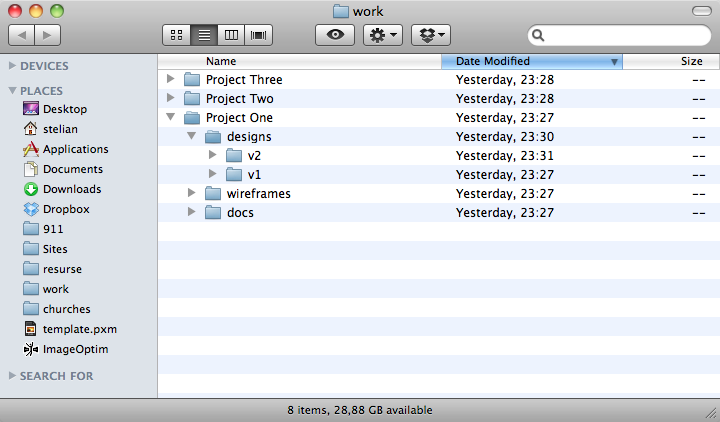
    The first part of the problem

    For some reason, this is how I organize my work folder:

    My work folder

    Where Finder fails short

    The problem with Finder is that the date of a file only affects the date of its direct parent. Everything a level up remains unchanged. So this is how you end up with the situation below:

    Continue reading…

  • 07 May 2013

    Setting S3 headers in Transmit for better website performance

    If you haven’t used S3 yet, there’s a good chance you’ve at least heard about it. Amazon’s data storage service is one of the most popular of its kind and with the recent price slashing, it makes a very attractive option for storing static files. But soon after you’ll start using it you might notice that it doesn’t behave like regular hosting. For example, if you want to enable caching on your files, it’s just not possible to put an .htaccess file in a bucket and finish the job. The cache option must be set for each file individually.

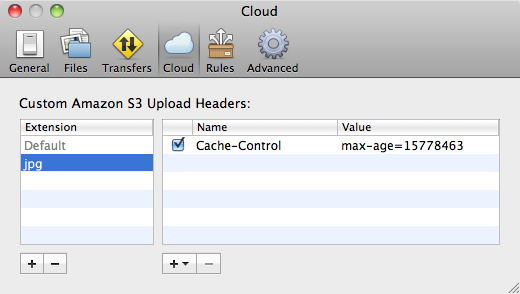
    If you’re a Transmit user like myself, this is how you add the Cache-Control header to your files:

    Transmit S3 Cache-Control header

    Continue reading…

  • 07 Apr 2013

    How I like my Finder

    When it comes to file browsers, my favorite setup is a side-by-side mode(source and destination). Something like this:

    Midnight Commander

    Unfortunately, Finder doesn’t have this option and although there are apps that offer this feature(Path Finder, TotalFinder, Xtrafinder), the way they’re designed doesn’t work for me.

    Continue reading…

  • 28 Dec 2012

    Mac apps I’ve used most this year

    Mailplane

    Mailplane

    My favorite Gmail client. Although you basically get the Gmail interface inside a desktop app, Mailplane has some great features like multiple accounts, Growl integration and badge notifications. To be honest, I never got on the Sparrow train, but that’s OK because, as you probably know, it’s been discontinued.

    Yorufukurou

    Yorufukurou

    It should probably be the first on the list. It’s the reason why I stopped writing my own Twitter client. Lots of great features which, combined, help you separate the signal from the noise. For sure, this paragraph is not enough to tell you how great is, that’s why I’ll probably make a video for it. But in the meantime you can give it a try; it’s native and, surprisingly, free.

    1Password

    1Password

    Definitely, the password manager. Helps me store all the different and complicated passwords I have. No to mention, with the help of it’s browser extensions, logging in to your accounts becomes hassle-free. Working on multiple computers is not a problem either, since you can sync the library with Dropbox. And there’s also an iPhone app. More win!

    Continue reading…

  • 08 Nov 2010

    Duplicate group shortcut in Photoshop

    As you may noticed, PS does not have a shortcut set for duplicating a Layer or Group. But, that’s OK, cause almost everybody uses Cmd+J when in need to create a copy of the current layer. That’s the thing – it only works for layers. When you need to duplicate a group you have to drag the damn thing to the new icon in the Layers palette or go to the Layer menu… whatever.

    Well, let’s assign then the Cmd+J to the “Duplicate Group…” item in the Layers menu. Photoshop can do that – set custom shortcuts. But here’s the the nasty part: now, when you press Cmd+J a very annoying dialog will show up and you have to hit at least Enter to get rid of it.

    Continue reading…

© Stelian Firez • Email • Twitter • Dribbble • Front-end Front